
Thoughts on programming, web development and design.

Circuit Board

Category: Web Development Page 28 of 31

5 Tips and Tools for Improving Your Coding

BookmarkA short list of tips and tools that can help you to become a better developer from coding tips to showcases on interface design.

  1. 7 Crazy Tips That Will Help You Become A Better Coder Louis Lazaris explains that you can become a better coder by writing code and solving your own problems, not just cutting and pasting the code of others. He provides some tips for helping you to improve your coding skills.
  2. 10 Web-based Sandbox Tools For Testing Your Code Snippets A Sandbox Tool allows you to test code snippets without having to set up a test website in order to test them. They also allow you to share and collaborate with other developers.
  3. Five Free or Open Source Text Editors For Developers Sometimes, you need a text editor to get certain projects done. Tech Republic has complied a list of open source text editors that you can check out.
  4. 4 Key Considerations for Scaling Your Database Your app may need a database to store information. When choosing a database solution, you want to make sure that it can handle the volume that you place on it. Mashable defines 4 key things to think about when choosing a database solution.
  5. Showcase of Great Web App Interfaces What makes a great web app interface? An app that focuses on usability, simplicity and helps users get the job done. Does that mean that they have to be attractive? Not all useful apps are attractive. These SEO apps are simple, usable and ugly.


HTML5 Tag References

HTML5 BadgeWhat to learn how to use HTML5 tags in your projects? I found three resources that can help you learn how to apply an HTML5 tag quickly.

  • The html5 tutorials has a sidebar list that allows you to open the tag description that you are interested in. It defines the tag, shows you an example and describes each attribute if any.
  • HTML5 Tag Reference also has a sidebar list that allows you to open the tag that you are interested in. The home page shows you the new tags and tags not supported in HTML5. It defines the tag, shows you an example and describes each attribute if any. They also tell you the differences between HTML4 and HTML5. Plus W3Schools provides you with tips and notes on using the selected tag.
  • Structural Tags in HTML5 defines the new structure tags in HTML5 that can replace the div. It provides a simple example that demonstrates the use of these tags. You also learn how to get JavaScript to get IE to recognize HTML5 elements.

Until you have create a few HTML5 websites, you can use these resources to help you learn it quickly.

Inside Out Design

Computer with codePeople find your website from different places. They don’t always land on the Home page, instead they open an interior page. Your interior page needs to entice visitors to stay. If it doesn’t, they won’t even look around further. All that time you spent on crafting the perfect home page goes to waste. Do you design your website starting with the Home page and work your way inwards? Most designers do. Jonathan Christopher explains in Improving Your Process: Work From the Inside Out that designing the simplest interior page first and work your way to the home page can help you build a better and consistent website.

Web Programming is more than remembering syntax

Stefan Mischook of killersites.com talks about how web programming is more than memorization. It is about the development process. Being able to create a useable and attractive website is more important than if remembering specific syntax. If you forget, you can always look it up. Even experienced web developers and designers can’t remember everything about of JavaScript or CSS.

A Day at WordCamp in Chicago

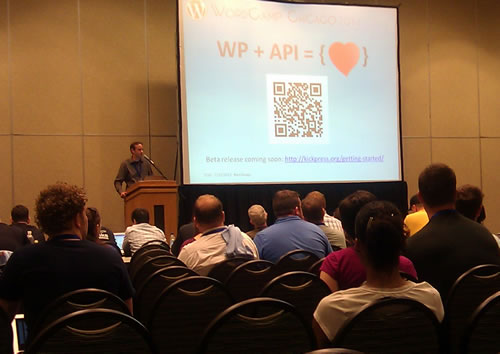
My schedule only allowed me to attend one day at WordCamp in Chicago. I went to the Saturday sessions.

WordCamp Chicago OpeningWordCamp Chicago took place at DePaul University. The website had directions from one of the sponsors, MapQuest. Their directions made it simple to find DePaul University. Once you walked in the conference was easy to find.

My favorite sessions were “Advanced SEO: Thinking like a Searchbot”, “Developing for Success, or Any Fool Can Do This” and the Unconference track “WP Frameworks (or not…). In “Advanced SEO: Thinking like a Searchbot” provided tips talked about how search engines are the new  gatekeeper for information and that you should use links in your content because it count more than in the sidebar. Heather Acton led the “WP Frameworks (or not…) Unconference session. The discussion on WP Frameworks was fun. We had a diverse group of people: developers, designers, new to WP and experienced with WP. As I group, we talked about the benefits and challenges of using frameworks. I learned that you need to decide what your projects goals are and then decide if creating your own theme or using a framework is the better option. Frameworks don’t fit all projects. In “Developing for Success, or Any Fool Can Do This”, Brian Richards gave his tips for success by talking about his experience as an entrepreneur and using humor to help motivate the crowd to succeed. He said that “You don’t have to be the best, but you can’t be the worst.” Brian demonstrated that “business = building relationships”.

Page 28 of 31

Powered by WordPress & Theme by Anders Norén