Thoughts on programming, web development and design.

Circuit Board

Category: Web Development Page 4 of 31

5 Website Speed Optimization Tips

Does your website load fast? A slow loading website can make a user decide to go somewhere else. Speed is important because slow websites can lose money and users. No one wants to wait until your website loads.

5 Website Speed Optimization Tips

Photo by Gerd Altmann

Why is your site slow?

Many factors could be slowing your site down. The common ones are:

  • Large image sizes
  • Large CSS files
  • Heavy use of JavaScript
  • Old legacy code
  • Too many plugins and/or widgets
  • Server Issues
  • Slow network connection especially on mobile

How slow is your website?

A website speed test can tell you how fast your site is. You can use tools like PageSpeed Insights by Google or Pingdom Website Speed Test. Both tools will give you insights into how slow your website is and what you can do to fix it.

When you get a report from these tools, you’ll see many metrics. Focus on these three metrics: Largest Contentful Paint, First Input Delay and Cumulative Layout Shift. Google calls them Core Web Vitals. Core Web Vitals measure the user experience — loading, interactivity and visual stability.

5 Website speed optimization tips to start with

What do you fix first? It depends. You’ll need to decide what affects the users the most.

1. Large image sizes

Large image sizes can drag down your website’s loading time. You can use a Website Image Analysis Tool to decide which images to handle first. Tools like ImageOptim can help to optimize your images for the web.

2. Large CSS files

CSS files get large over time. They can include leftover unused selectors, workarounds and duplicated code. To fix these problems, you need to refactor your CSS. Refactoring CSS is not an easy task but necessary one. Use this guide on how to refactor CSS without creating new problems.

3. Heavy use of JavaScript

Too many JavaScript files loading can slow your site down. Do you need all of them? Audit your JavaScript files to see if you still need them. Or use other techniques to limit their affect on the website.

4. Old legacy code

Code can get old and not for the better. Is your code using old code that has been depreciated? Look at your code to see if you can remove it. Or refactor it and make it better.

Are you using plugins that you no longer need or have newer versions? Make sure your plugins or widgets aren’t slowing your site down.

5. Server issues

Is you website still slow after fixing other web performance issues? If yes, then you need to look at your hosting server. Are you using a server that fits you needs? You may need to consider moving to a new host or paying a bit more for a premium service.

Read more about Optimizing Your Website Speed

Photo by Gerd Altmann

Writing Semantic HTML

What is semantic HTML?

Semantic HTML is using specific tags when writing HTML. These tags convey meaning about their intended purpose. Both humans and computers can understand the meaning of your code when you use them. Browsers, search engines and assistive technologies use these tags to create a better user experience.

Matrix Binary Code

Photo By PixxlTeufel on Pixabay

Why should I use it?

It makes your code easy to read. You’ll be able to scan quickly through the code to understand how it is structured. Semantic tags also make it faster to write code. You don’t have as many decisions to make when you use the semantic tags.

How to get started?

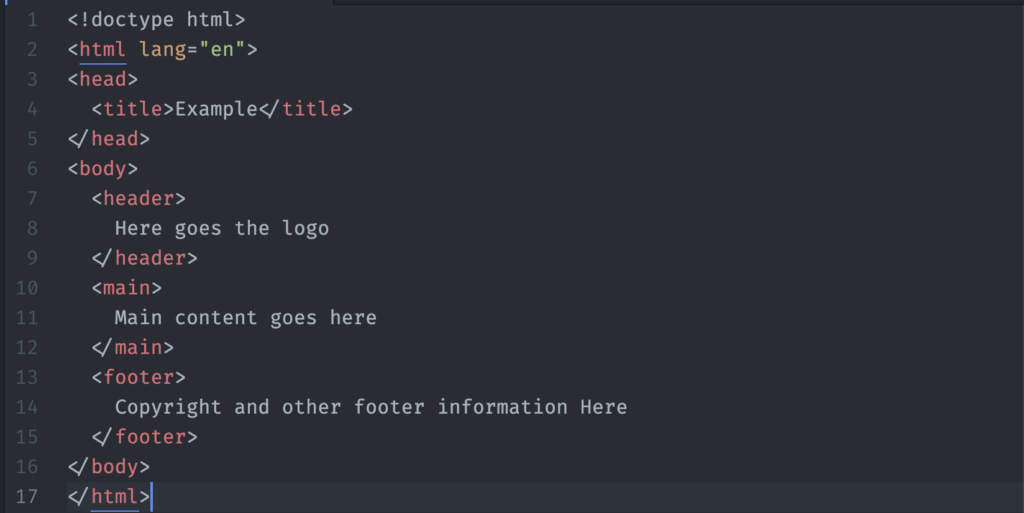
HTML5 introduced new tags – semantic tags. Tags like <header>, <main> and <footer>. With these tags, you create a web page structure that is readable to both search engines and people.

Basic HTML 5 Code

Your main content lives inside <main>. You can use tags like <p> and heading tags like <h1> to provide some structure. To provide further meaning to the content, use tags like <article> and <section>. The <article> tag contains content that can be removed and put on another page. You can use the <section> tag when you need to wrap groups of related content. Use the HTML semantics cheat sheet to learn when to use which tags for the right job.

What about the <div> tag?

HTML has non-semantic tags like <div>. Its generic nature allows you to define its purpose through code. You can use the <div> and <span> tags in your code. Use them to group elements that don’t have any specific meaning. When you need more specific meaning, choose semantic tags over non-semantic ones.

Find out more about Semantic HTML

Filling Up Empty States

What are empty states? These are spaces on your app or web page which can be empty or blank. Screens or panels where no data or content displays. Why? Your users haven’t entered anything or data can’t be displayed.

empty room with wall wall and plant

Photo by: Darkmoon_Art on Pixabay

You might be familiar with empty states. Some typical scenarios are:

  • When a search returns no results
  • You have downloaded a new app and haven’t entered any data or content
  • An error has occurred
  • When you have deleted all of your data

What can you do? You could leave it empty. Or display information to the user. What kind of information would you put here? You want to use this space to communicate the app’s status. Teach new users how to get started or discover new features.

Communicate status to the user

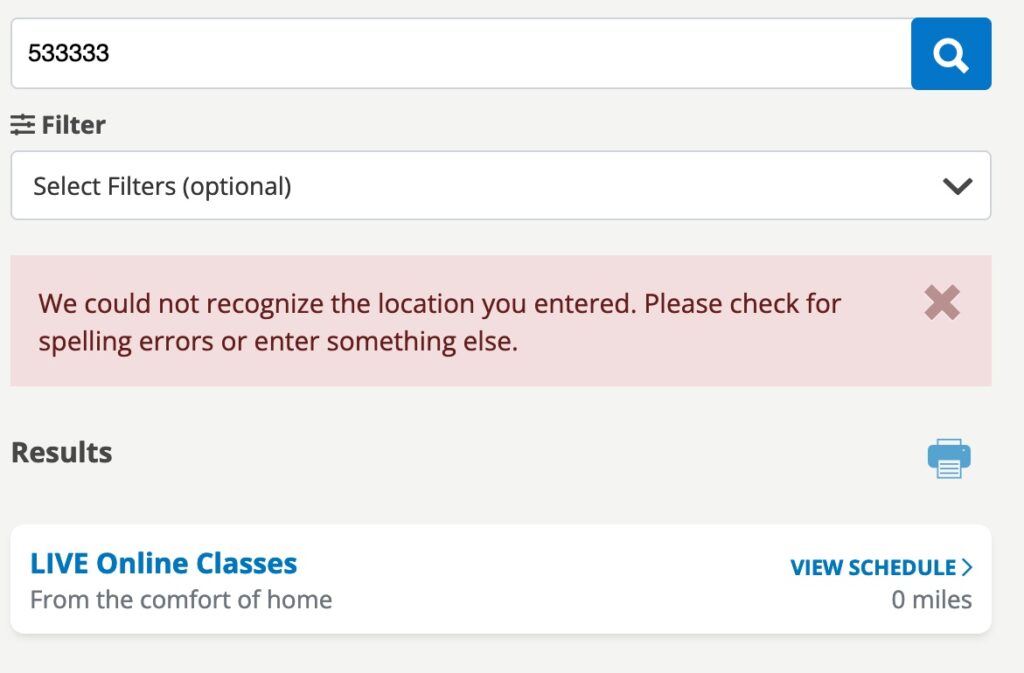
When you use an app, sometimes you may wonder if it is working. This can occur when you run a search and get no results back. Or an error has occurred.

Silver Sneaker Location Search Error

Teach users how to get started

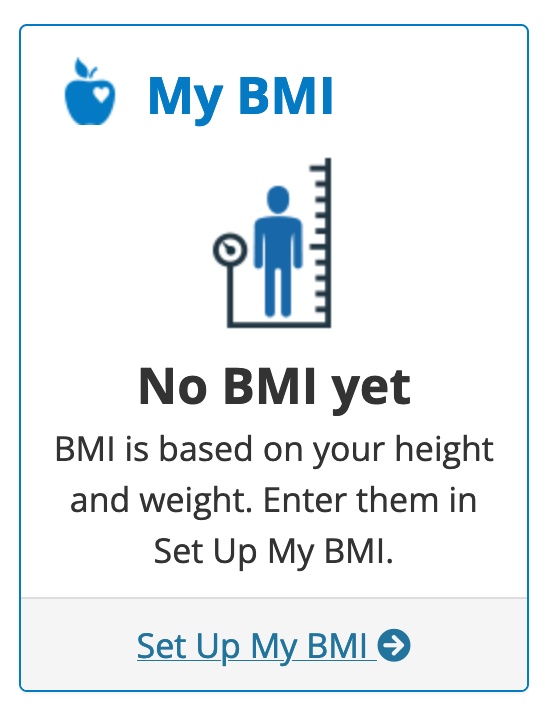
A blank or empty space can be intimidating to first time users. Use the space to teach your users what to do next, you help them to get started using your BMI Setup Guide

Starter Content

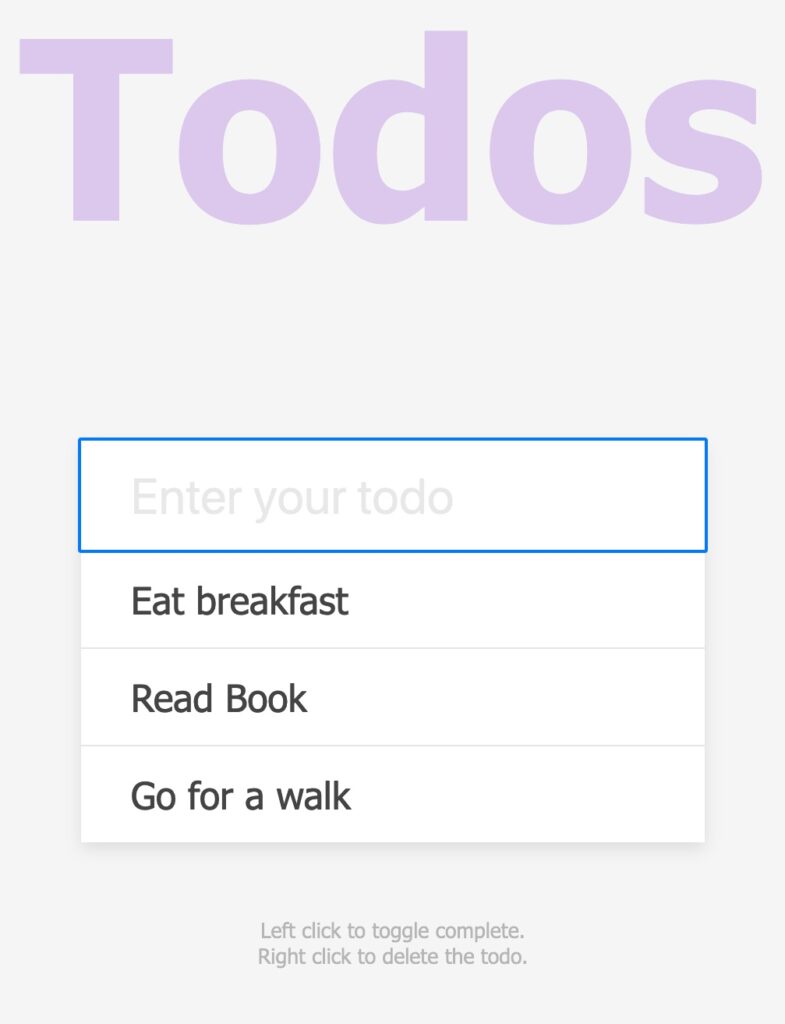
Show your users how to create new content with examples. Use starter content to give them an idea on how to fill the space. If you sharing photos, you may put a couple of photos in to demonstrate how that works.

Todo App with Starter Content

Summary

Don’t leave your users guessing what the app is doing. By using empty states, you help your users to get started using your app quickly. Learn how it works and be confident they can get what they want to do done. Refer to Designing Empty Spaces in Complex Applications to learn more.

Making a JavaScript Quiz

People like to take quizzes for fun. Making a JavaScript quiz can be a fun challenge. Pick a topic, collect questions and build the quiz app. You can write one in any web development language you prefer. I wanted to create one in JavaScript.

What do you need to create a quiz in JavaScript?

  • A quiz topic. I love to eat chocolate. Chocolate is a fun quiz topic. I compiled a list of questions on chocolate.
  • A web app. I chose to build it using HTML, CSS and of course, JavaScript.

Other requirements

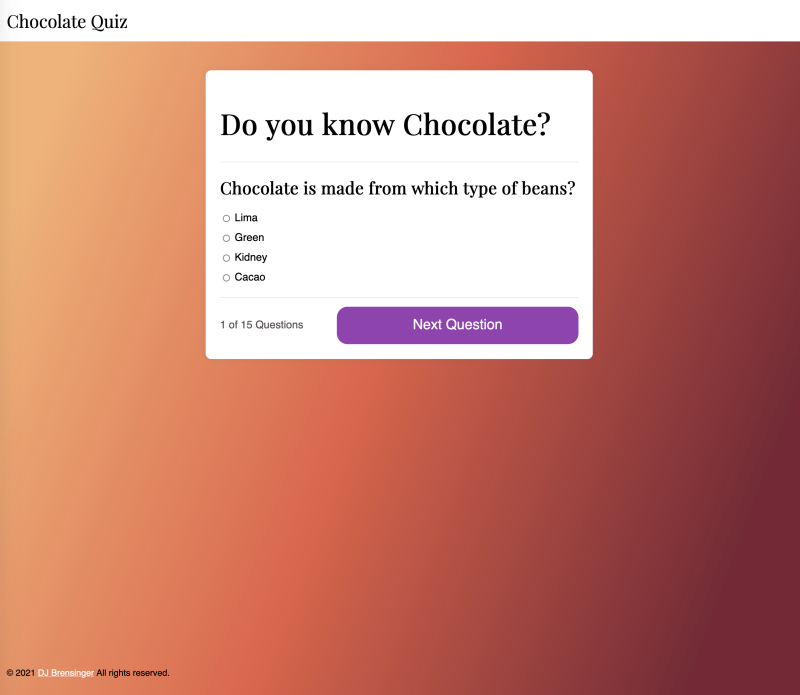
I wanted to use FlexBox for the layout. Plus a counter that shows you what question you are on. I included a photo of chocolate as well.

Chocolate Quiz showing first question

Building the app

The structure for a quiz is simple. It should display a question, a list of answers and track the number of questions that you get right. Then, it shows you summary of how well you did at the end. Plus, it should give you the option to try again.

I started with a simple quiz tutorial and modified it. First, I edited the code to include my questions on chocolate. Then, I looked at a quiz example with a timer and modified my code to add question counter.

Finally, I updated the code to include the chocolate photo into the results. It required adding one line of code.

<img src="images/60-seconds-of-love-sr2QGGnzy8k-unsplash-700.jpg" alt="amul chocolate" class="quiz-image" />

I wanted to add a sticky footer to the bottom of the web app. The web page uses FlexBox. I need to modify the layout to create the footer using FlexBox. CSS-Tricks’ FlexBox option fit well with the app design.

CSS Gradients

I wanted to use a gradient for the background. You can either use a CSS gradient generator to create it. Or use one created by designers. Gradient Hunt lets you choose from a selection of pre-made gradients.

What to do differently

A quiz on chocolate needs more photos of it. The design would need to show more chocolate as you move through the quiz. Next, I would like to show chocolate facts with each question. Each question has to have four answers; no true or false. I would change it so I can add true or false questions.

If you like chocolate and want to take a quiz, try out this Chocolate Quiz.

3 Tips for Getting Back Into Your Development Flow

Every day is a bit different. You may have new priorities and problems to solve. Meetings and issues that require your attention. Developers need to focus on the code they are writing. When you stop working, it can be hard to get back into a development flow.

3 Tips for Getting Back Into Your Developer Flow

Image by Gerd Altmann from Pixabay

What is flow? Flow is described as a cognitive state where you are completely absorbed in an activity. You are intensely focusing on your chosen activity.

Returning to your work

There are times when you need to stop working. You have to go to a meeting, eat lunch or leave work for the day. When you return, it takes time to get back into state of flow. What can you do to help get back into your development flow?

1) Leave yourself note

The simplest thing you can do is leave yourself a note. You can leave a comment in your code to remind yourself what to do next. Use email or have a tool like Slack remind you of what you were working on.

2) Rule of 3

Before you leave for the day, write down three things that you want to accomplish. When you start work the next day, work on those three things. J.D. Meier explains why the rule of three is a simple way to get results.

3) Make a shutdown process

A shutdown process is a set of tasks that you do to help you finish up for the day and prepare for the next work day. Workday shutdown rituals help you to separate your work day and personal time.

More ways to keep your developer flow

Page 4 of 31

Powered by WordPress & Theme by Anders Norén