Thoughts on programming, web development and design.

Circuit Board

Category: Web Development Page 16 of 31

Getting Help With Your Website

Have you ever installed or uploaded something to your website that cause an error? It was working fine and then suddenly it wasn’t. You may have tried to fixed it and nothing seems to work. What do you do now?

Andrew Wikel explains how to get help with your WordPress Site. His tips on detailing your issue, what to send to tech support and staying calm can be applied to any type of website. You don’t have to use WordPress to use his tips.

How to get support?

  • Slow down and breathe. Getting angry or mean won’t help solve the problem.
  • Provide as much information as possible.
    • List the steps that caused the problem
    • Include screenshots. Support techs love getting screenshots.
    • If possible, create a video of the problem
    • Include links or url’s to the problem
  • Remember, there is no such thing as too much information.

Don’t forget to say Thanks. You may talk to the same person several times in order to get some problems fixed.

What can I do to minimize issues?

  • Download themes, plugins or add-ons from sources that you trust. If you download them from anywhere, you could end up with more trouble than you wanted.
  • Read reviews on the plugins or themes. Do people use it? Would they recommend it to others?
  • Install plugins or add-ins only as needed. The more plugins you have installed, the greater the chance of one of them causing you trouble.
  • Make regular backups of your website. A backup could help you restore your website after you install some bad code.
  • Ask people you trust for their recommendations. Developers and Designers usually have favorite themes, plugins or places to get them from.

Summary

When a problem occurs on your website, remember to stay calm. Take a screenshot or video of the problem. Write down all the step that it took to cause the issue. The more information you provide, the better the chance that tech support or developer can solve the problem. Use code that comes from sources and people that you trust.

What other tips to you have for solving website problems?

Building a theme based on a photo

Where do you get ideas for a theme? Do you start with a color palette, photo or website? I decided to use a photo to create a theme for my blog. I found a free stock photo and started design my new theme.

cropped-CurcuitBoard.jpg

How Did I Create the Theme?

  • Found a free stock photo
  • Generated a color palette from the photo
  • Start with an HTML Theme
  • Build the Theme in WordPress
  • Test and fix issues
  • Upload and apply the final theme

Generate Color Palette from Photo

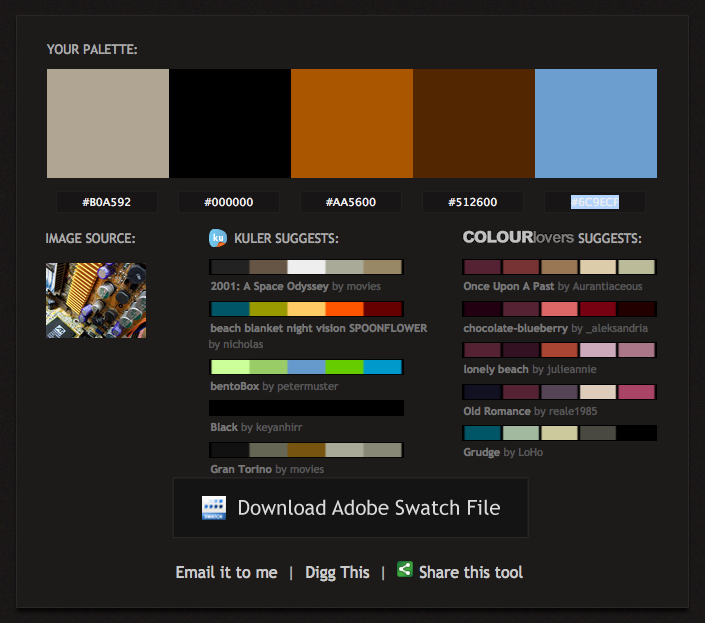
I uses Adobe Kuler, now called Adobe Color CC, to create my palette. Here is my palette:

Curiosita Labs Color Palette Choices

Start with an HTML Theme

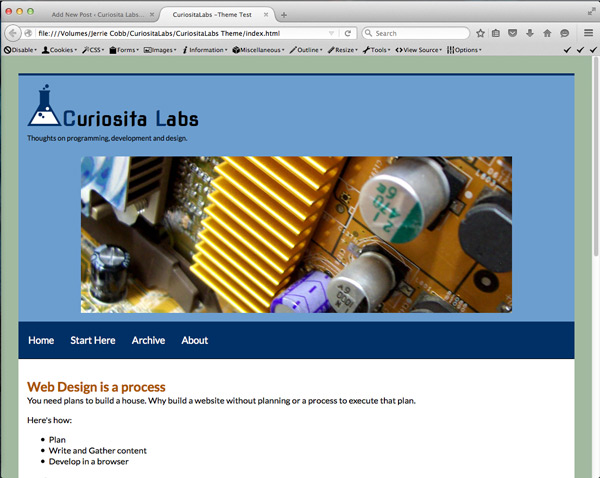
Using the color palette, I choose a color for the background, heading and more. Next, I built a test page in HTML. HTML makes it quick and easier to design in the browser. You can see your results quickly.

Test Theme In HTML

Once I had the page made, I evaluated the results. Do the colors look good together? Does the overall design do what I want it to do? I had some issues with the colors. They didn’t work well together. I changed out the colors and reevaluated the results. Once I got a design that worked, I started building the theme.

Building the theme

WordPress has starter themes. I wanted a theme that was responsive and simple to work with. At a WordPress meetup, they talked about using Underscores. This starter theme is recommended by local WordPress designers.

Next, I started adding my CSS to the starter theme’s CSS. I had to make adjustments to ensure that the CSS works with WordPress. If you don’t, your theme may have unexpected results. Then, I added my theme to WordPress and started testing. I had to make additional changes. A few tweaks to fix things that didn’t work that way I had planned.

What was the Result?

The result was ok. I went back to tweak the colors because the original colors didn’t work well for me. Working with colors from that photo was challenging. The colors work well in the photo. When interpreted to hex colors for CSS, they didn’t seem to look as good. The challenge was learning how to get the right mix of colors. Some choices worked better than others. The colors may look good in a photograph, but they make not work well in designing a theme.

This was an experiment. Not all experiments work out. From every experiment, you learn something. You learn what to do, what not to do and how to do better the next time.

Have you had success in designing a theme from a photo?

How do you build a better WordPress Widget?

When you first create a new theme for WordPress, you may forget about widgets. WordPress comes with widgets that you can use. But what if your clients wants to add a widget? Will it work with your design? What if they want to add something that isn’t offered? Josh Leuze at WordCamp Milwaukee talked about how to build better and more interesting WordPress Widgets. In his talk, he explains how to design widgets, plan out your widget, make your widget responsive and how to upgrade your widget with a plugin.

Watch his talk to learn how to build a better WordPress Widget.


Tools on Creating Images for Your Projects

Want to create images for your projects? Photos and images get shared more frequently than plain text. You want your images to be unique. How do you get started?

Where to get photos?

You have two choices. Use your own photos or someone else’s. Not a photographer? Don’t have the time to take all of the photos you need for your projects? You can use sites that have free photos. There are quite a few to choose from. Some sites and photos have different requirements. You may use some photos in personal and commercial projects. Check each photo on how you can use it to avoid copyright infringement issues.

Pexels

Here are a few sites to choose from:

Remember, when you use these sites, check the license to make sure you can use it in your project.

What tools can I use?

Once you have the perfect image for you project, you need to change it. If you have a photo editing tool like PhotoShop or GIMP, you can change the photo to look the way you want. Not a designer? You can use online tools like:

What if you want to create a quote photo (Photo with a Quote)? You can use one of these 9 tools to make a quote photo.

No tool is perfect. Each tools has its quirks, You’ll need to experiment to see which tool works for you. By using these tools, you can create images for your web sites or social media projects.

Related Article

Curiosita Labs Post on How to Add Text To Images

Do You Need a Website Refresh or Redesign?

What do you do if your website is old or needs to change? Do you start over? Should fix what is not working for you? With a website, you have two options: refresh or redesign. Fix what you think needs an update or start over with a brand new site.
Redesign or Refresh?

Refresh or Redesign

What is a refresh? Fo example if your website was a house, a refresh would be like making over a room. To update your room, you may repaint the walls, replace a rug, curtains or even pillows and add new furniture. When you refresh your website, you leave the way the website functions and change how it looks. This may include changing the colors, fonts or even images.

What is a redesign? A redesign is where you start over. Instead of a makeover, you would tear the house down and build a new. With a website, you start over by building a new site.

When should I refresh my website?

Refresh or redesign? It depends on your needs. Why are you updating your site? Do you need to fix some small issues? Has your business changed and your website no longer reflects your brand? If you need to make small fixes, than a refresh will work for you. If you need to have it reflect how your business has changed, you want to redesign.

How do I do refresh my website?

  1. Decide what your goals for the website are.
  2. Look at your content and determine if you need to add, delete or update pages.
  3. Prioritize what you want to work on.

What are you site goals?

When looking at a redesign or refresh, you should reevaluate your site goals. Is it performing the way you expect? Does it reflect your current brand? Are there any pages that just don’t work?

Do you know what content your site has?

Audit your website by figuring out how many pages you have and what they focus on. Is each page current, out of date or needs a slight tweak? Decide which pages you want to work on, remove and update.

Prioritize

What do you want to work on first? Does your content need updating? Do you need to change the look and feel first? Decide what you want to work on and schedule how you are going to accomplish fixing or updating your site.

Summary

Your website should change to reflect who you are as a business. This means you may need to either refresh or redesign your website. What you choose to do depends on your goals. Sometimes, your may need simple fixes and refreshes your website is the best choice. Other times, you may choose to start over because it is just easier and a better way to achieve your goals.

Page 16 of 31

Powered by WordPress & Theme by Anders Norén